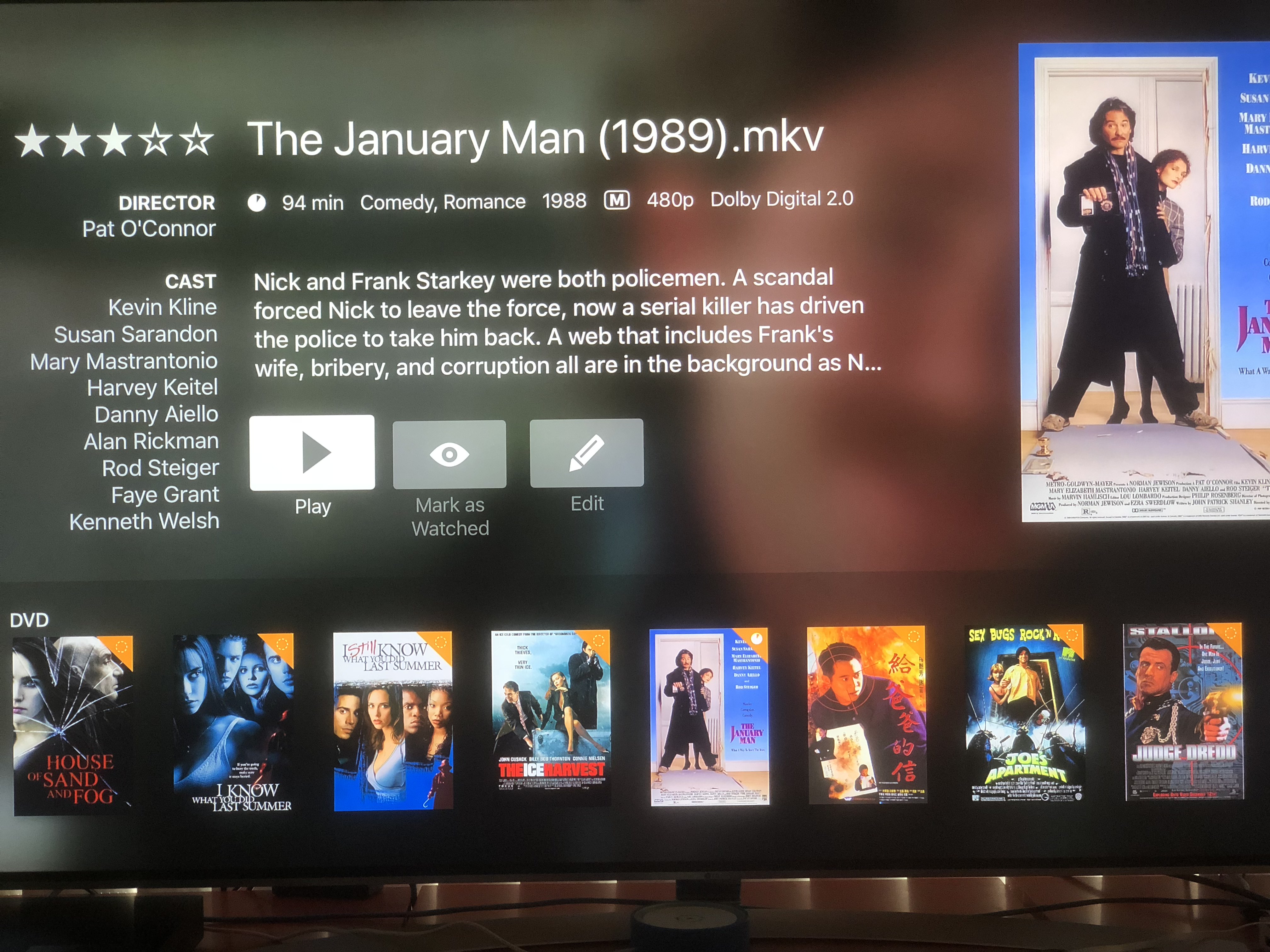
Hi there,
I love this app… I have just switched from using Kodi on 4K media players where DV seemed a long way off if ever.
One thing I have noticed is that all of the MKVs I have that are from PAL DVDs show as 480p in the UI when they should say 576p…
I normally have .nfo files in the directory but I get the same display for files I haven’t yet placed in their own directory and have been scraped automatically.
Even playing these MKVs in their entirety does not rewrite this information.
Heh, I even tried adding the following into the .nfo which I had to do in Kodi for 4K files… but it had no effect.
  <fileinfo>
    <streamdetails>
      <fps>25</fps>
      <video>
        <aspect>1.85</aspect>
        <resolution>576</resolution>
      </video>
      <audio>
...
Here is the mkvinfo output for one of my MKV files showing the framerate and resolution:
MacBook-Air:NFO $ /Applications/Mkvtoolnix.app/Contents/MacOS/mkvinfo /nas/eon1/media-eon1/DVD/The\ January\ Man\ \(1989\)/The\ January\ Man\ \(1989\).mkv
+ EBML head
|+ EBML version: 1
|+ EBML read version: 1
|+ EBML maximum ID length: 4
|+ EBML maximum size length: 8
|+ Doc type: matroska
|+ Doc type version: 2
|+ Doc type read version: 2
+ Segment, size 3318367525
|+ Seek head (subentries will be skipped)
|+ EbmlVoid (size: 1021)
|+ Segment information
| + Timecode scale: 1000000
| + Muxing application: libmakemkv v1.12.0 (1.3.5/1.4.7) darwin(x64-release)
| + Writing application: MakeMKV v1.12.0 darwin(x64-release)
| + Duration: 5594.040s (01:33:14.040)
| + Date: Sat Mar 17 03:04:22 2018 UTC
| + Segment UID: 0xfb 0x02 0x09 0xbf 0x98 0xb5 0xa1 0xdf 0x05 0x0b 0xa7 0x03 0xa0 0x89 0x27 0x31
|+ Segment tracks
| + A track
|  + Track number: 1 (track ID for mkvmerge & mkvextract: 0)
|  + Track UID: 1
|  + Track type: video
|  + Default flag: 0
|  + Lacing flag: 0
|  + MinCache: 2
|  + Codec ID: V_MPEG2
|  + CodecPrivate, length 160
|  + Default duration: 40.000ms (25.000 frames/fields per second for a video track)
|  + Video track
|   + Pixel width: 720
|   + Pixel height: 576
|   + Display width: 1024
|   + Display height: 576
| + A track
...
So where is the media info coming from? Is it a bug in the Apple APIs?
720p, 1080p, 2160p all appear correctly.
FYI I am using NFS mounts for my media from NASes running EON Solaris with zfs providing NFS services.
My Apple account is on the Australian App store in case that makes any difference.
Apple TV Language is set to English and the region to Australia, Time Zone is Melbourne.
I just noticed that The January Man is available on Blu-ray so this problem will go away soon 
Regards
Paul