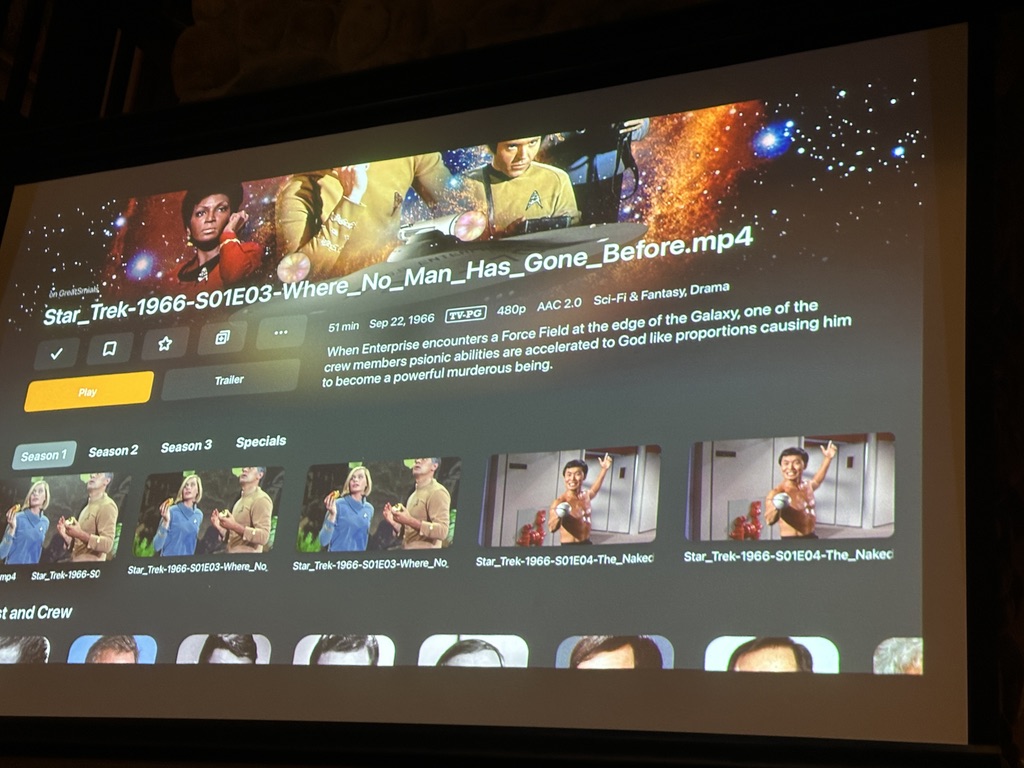
It looks like this is happening on one TV show, but I have dozens and can’t really check them all. I’m on Infuse version 8.5.8 on Apple TV and on the Mac. This problem doesn’t happen on the Mac.
On the original Star Trek, on my Apple TV Infuse, I have 3 copies of each episode:
When I play the first of an episode, when it’s done, it goes to the next instance of the same episode.
I’ve double checked, in case I had soft links to the files, and there’s only one copy of the file. When I navigate, in Infuse, to the folder, it only sees one instance of each file.
As I said, I have dozens of TV shows and trying to check each one in Infuse would take hours, but I can’t see why, if it happened on one show, it wouldn’t happen on others.
Any idea waht causes this or how I can get rid of it?
When the folder view shows one file but the Library lists three, the usual cause is that the same content gets indexed through more than one share or favorite - for example the same server added twice (auto-discovered plus manual) or reachable via two protocols. The Firecore support article on setting up your Library says the Library is built from the Favorites, and that all added Favorites are scanned in by default; you can untick them under Settings > Library. So on the Apple TV I would open Settings > Library and check whether that Star Trek folder is effectively included twice, and compare the Shares list with the one on the Mac. Removing the duplicate share or favorite should clear the extra copies.
I thought, “No, that’s wrong,” and went on to do something else. Then I had to think though this.
The Apple TV installs are acting differently than the Mac install. I’ve favorited the same folders on the Mac version as on the Apple TV version - I’m hoping it’s due tot he settings you mention. I’ll see if I can fix it through there.
Once you pointed out the Favorites issue, I knew just what shows to check and, basically, any shows in my Playlist folder are the ones showing up multiple times. (Once I knew where to look, checking what was effected was easy.)
Side note: I always like to report when I solve a problem - but I might not get back here now for a good while. Our internet went out and it’s Starlink - mounted on a pole far from the house with an equipment box that failed on me. I’m not about to pay that company hundreds for another that fails after a few years, so I’m having to do a lot of research to buy or make a new box. While I’d like to fix this, it’s not nearly as important as fixing internet - and then catching up with the work for my business. Things that aren’t “have to fix” right now are slow.
Okay, due to Murphy’s Law, I thought this would take a lot of attempts or tedious settings manipulation to change it, but just removing Favorites from the Library did it. I still have my Playlists folder under Favorites, so I can go there, find ALL my playlists, and go to the Library and find only one copy of each episode.