Sorry for the dumb question but I can’t seem to figure out how to remove a Jellyfin share from the Mac client. I clicked the pencil icon next to it but there’s no delete option (see below). What am I missing please? Thanks!
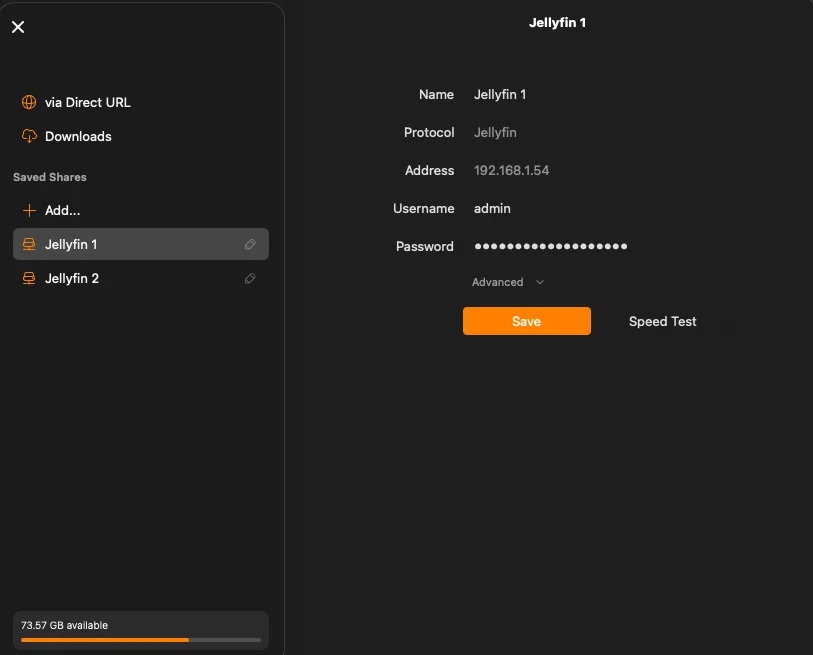
I’ve never used jellyfin, but after clicking the edit/pencil all my other shares have a big FORGET THIS SHARE button on the upper right corner of my Mac client…
This is true for WebDAV, SMB, Plex, and I’m assuming Emby (as I removed one of those in the past).
It’s on the same row as your “Jellyfin 1” on the top line.
Thanks, interestingly if I press the pencil icon using the iOS app, I can see the forget option. But for some reason on macOS it only has the save option :S
I removed it from my iOS app but it’s still there on macOS, both clients have the iCloud sync option enabled too
I updated the Mac app and the “Forget this Share” option has appeared.
All sorted, thanks 